
Integrating Custom SMS Gateways in XpressBot Using HTTP POST #
XpressBot provides a powerful and flexible way to integrate your own SMS gateway using the HTTP POST method. Whether you’re working with a local SMS provider, a regional gateway, or your internal SMS infrastructure, this method allows seamless message delivery and total control over your communication flow.
Why Use a Custom SMS Gateway in XpressBot? #
Using a custom SMS gateway allows you to:
- Leverage local or regional SMS providers not pre-listed in XpressBot.
- Reduce costs by integrating in-house SMS servers or open-source gateways.
- Ensure compliance with country-specific telecom regulations.
- Customize delivery parameters and manage message routing independently.
- Achieve greater delivery accuracy with gateways optimized for your region.
Use Case Scenarios #
This integration is ideal for:
- Businesses that already use custom or self-hosted SMS solutions.
- Organizations needing local language or regional message delivery.
- Enterprises requiring advanced logging, reporting, or failover control.
- Companies prioritizing data privacy by keeping SMS operations internal.
Steps to Integrate a Custom SMS Gateway in XpressBot via HTTP POST #
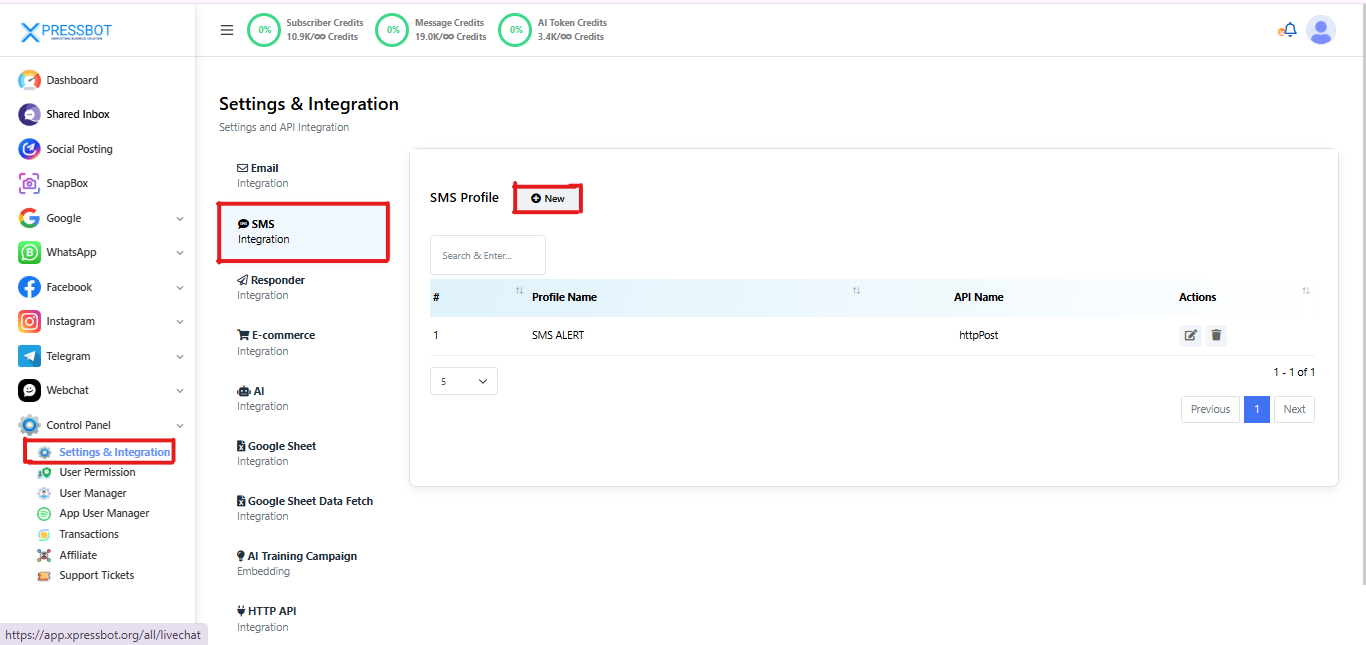
Step 1: Access SMS Integration Settings #
- Go to your XpressBot dashboard.
- Click on Settings from the left-hand sidebar.
- Under the Integrations section, select SMS.
- Click on the “New” button at the top of the SMS Profiles list to start adding your custom gateway.
step 2: Select HTTP POST as Integration Type #
Once you’ve clicked “New” under the SMS Profiles section:
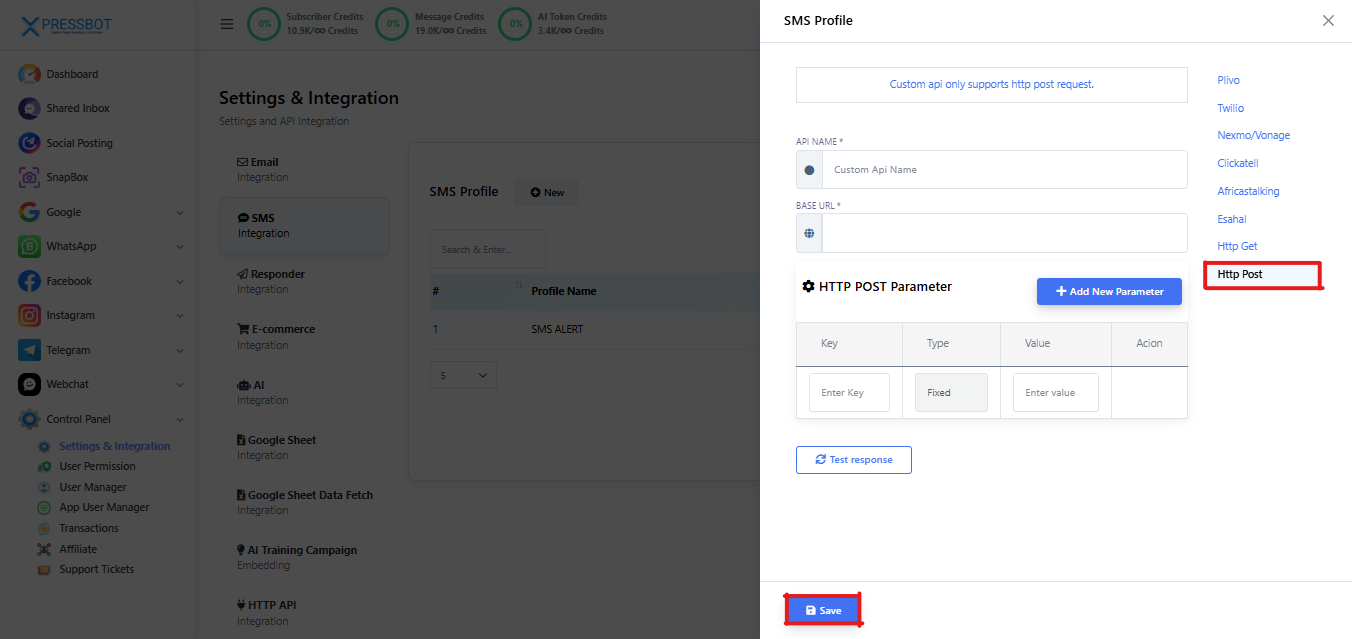
- A modal window will open to create your SMS configuration.
- From the Integration Type options on the right, select “HTTP POST”.
- Give your integration an easy-to-remember API Name (e.g.,
MyCustomSMS,RegionalGateway2025). - Enter the Base URL of your SMS provider’s API — this is where XpressBot will send the POST requests. Example Base URLs:
https://api.mysmsgateway.com/sendhttps://sms.yourcompany.in/api/v1/message
Step 3: Set HTTP POST Parameters #
Now you’ll define the POST fields your SMS gateway needs to send messages.
Add Each Parameter Manually: #
Click “+ Add New Parameter” and enter the following details:
| Field | Description | Example |
|---|---|---|
| Key | The name of the parameter expected by your SMS API | api_key, to, text |
| Type | – Fixed: for static values (like API key) – To: recipient number – Message: SMS text | Fixed, To, Message |
| Value | Only needed for Fixed types (e.g., your actual API key) | ABC123XYZ, leave blank for dynamic ones |
Example Configuration #
| Key | Type | Value |
|---|---|---|
| api_key | Fixed | ABC123XYZ |
| to | To | (auto-filled) |
| message | Message | (auto-filled) |
Continue adding all required keys exactly as mentioned in your SMS provider’s documentation.
Step 4: Test the Integration #
Once all parameters are added:
- Click the “Test Response” button.
- Enter a test number and message to verify if your configuration is working.
- If successful, you’ll receive a confirmation or response code from your provider.
tep 4: Save and Activate Your Custom Gateway #
After completing all parameter configurations and testing the connection:
- Click the “Save” button at the bottom of the modal window.
- Your custom SMS gateway profile will now appear in the SMS Profiles list.
- This profile is now ready to use in various features within XpressBot, including:
- Automated SMS Campaigns & Broadcasts
- OTP or Verification Message Flows
- Bot-triggered SMS alerts or reminders
You can create multiple SMS profiles for different providers or regions and switch between them based on your campaign needs.
Conclusion #
Integrating a custom SMS gateway in XpressBot using the HTTP POST method offers a flexible and powerful way to manage your SMS communications. Whether you’re working with a local provider, a regional SMS service, or an in-house gateway, this method ensures full control over your delivery process.
By following the step-by-step setup — from defining the API endpoint and parameters to testing and activating the profile — you can seamlessly plug in any SMS provider that supports HTTP POST.
This approach empowers businesses to:
- Reduce costs,
- Stay compliant with regional regulations,
- Improve delivery accuracy,
- And tailor SMS flows to their unique requirements.
Start leveraging your own SMS infrastructure today — and make XpressBot work exactly how your business needs it.