
Monitor Message Credits & AI Token Usage in XpressBot #
Effectively managing your communication resources is key to running budget-friendly and high-impact campaigns on XpressBot. Message Credits are required for sending messages across platforms like WhatsApp, Facebook Messenger, and Telegram, while AI Tokens fuel advanced AI-driven workflows such as auto-replies, intent recognition, and smart routing. Tracking these resources helps you stay in control, avoid overages, and enhance customer interaction.
Message Credits and AI Tokens in XpressBot: #
Message Credits #
These credits determine how many outgoing messages (text, media, or templates) you can send through WhatsApp or other supported platforms. Each message deducts credits depending on platform billing rules and your XpressBot plan.
AI Tokens #
AI Tokens are consumed when XpressBot’s AI features are triggered, such as NLP-based replies, smart message routing, or AI-based comment replies. Complex or long AI-generated messages will use more tokens.
Why Should You Track Usage? #
1. Cost Control #
Keep your messaging budget in check by tracking your live credit and token usage through the XpressBot dashboard.
2. Campaign Optimization #
Spot campaigns or flows that overuse AI features or credits. Simplify flows or adjust messaging to improve efficiency.
3. Resource Forecasting #
Plan ahead for monthly or seasonal campaigns by monitoring patterns and ensuring you purchase sufficient credits and tokens.
4. Performance Monitoring #
Connect your message and AI usage with engagement metrics (clicks, replies, conversions) to sharpen your overall strategy.
How to Monitor Message & AI Token Usage in XpressBot #
Keeping track of your usage in XpressBot is essential to manage your message credits and AI tokens effectively. Whether you’re running campaigns on WhatsApp, Telegram, or Facebook Messenger, monitoring usage helps avoid disruptions and improves performance.
Access Your XpressBot Dashboard #
- Log in to your XpressBot account.
- From the left-hand menu, click on Dashboard.
- You’ll land on an overview screen showing usage stats, recent campaign activities, and system alerts.
Locate the Usage Indicators #
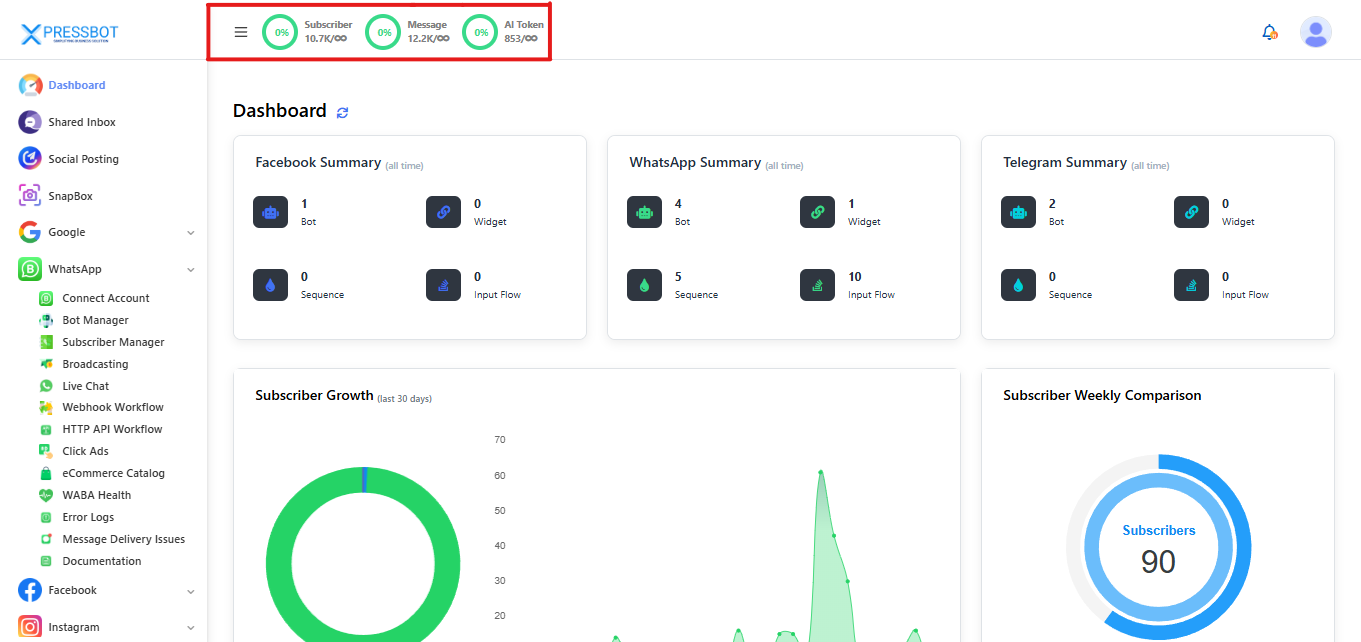
At the top of the Dashboard, you’ll find key usage metrics:
- Subscribers: Number of active subscribers vs. your plan limit
- Messages: Message credits used vs. available (e.g., 12,500/20,000)
- AI Tokens: Tokens used for AI tasks like Smart Replies or Intent Detection
Each section includes:
- Percentage Gauge: Shows how close you are to your limit
- Color Coding:
- Green – Usage below 50%
- Orange – Usage between 50%–80%
- Red – Over 80%, consider topping up or upgrading
Drill Deeper for Usage Details #
Click on the Message or AI Token card to explore:
- Channel-wise Breakdown: See how many messages or tokens were used on WhatsApp, Facebook Messenger, Telegram, or Web Chat Widget.
- Example: WhatsApp – 6,700 messages, Telegram – 3,200 messages
- Date Filters: Choose custom ranges (Today, Last 7 Days, Last 30 Days) to spot trends and spikes.
- Example: View token spikes caused by a “Product Inquiry AI Flow” campaign.
Export Usage Reports #
To share insights with your team:
- Scroll down to the Reports section in the Dashboard.
- Select “Usage Report” from the dropdown.
- Choose CSV or PDF format for export.
- (Optional) Set up automated weekly or monthly reports to be delivered via email.
Conclusion #
Monitoring message credits and AI token usage in XpressBot is crucial for maintaining smooth and cost-effective communication across platforms. By using the dashboard, color-coded indicators, and detailed usage reports, businesses can prevent overages, optimize campaigns, and plan resources proactively. Whether you’re running AI-driven flows or large-scale broadcasts, regular tracking ensures better control, performance, and ROI.