
Integrating Custom SMS Gateways in XpressBot Using HTTP GET Method
XpressBot offers smooth and flexible integration of custom SMS gateways via the HTTP GET method. This feature is especially helpful when your preferred SMS provider isn’t listed among XpressBot’s default integrations. By configuring a few API details, you can start sending SMS messages directly through XpressBot’s automation workflows — without switching platforms.
When to Use HTTP GET Integration
This method is ideal for:
- Integrating local, regional, or niche SMS providers not natively supported.
- Connecting in-house SMS infrastructure for greater control and privacy.
- Migrating from third-party services like Twilio, Nexmo, etc., to your own solution.
- Reducing message costs by using low-cost or existing SMS systems.
- Monitoring and logging SMS traffic through your own API endpoints.
Steps to Integrate a Custom SMS Gateway in XpressBot Using HTTP GET
Step 1: Open SMS Integration Settings
- From your XpressBot dashboard, navigate to the left sidebar menu.
- Click on “Settings” to expand the options.
- Under the “Settings & API Integration” section, select “SMS Integration”.
- Click on the “New” button to begin adding your custom SMS gateway using HTTP GET.
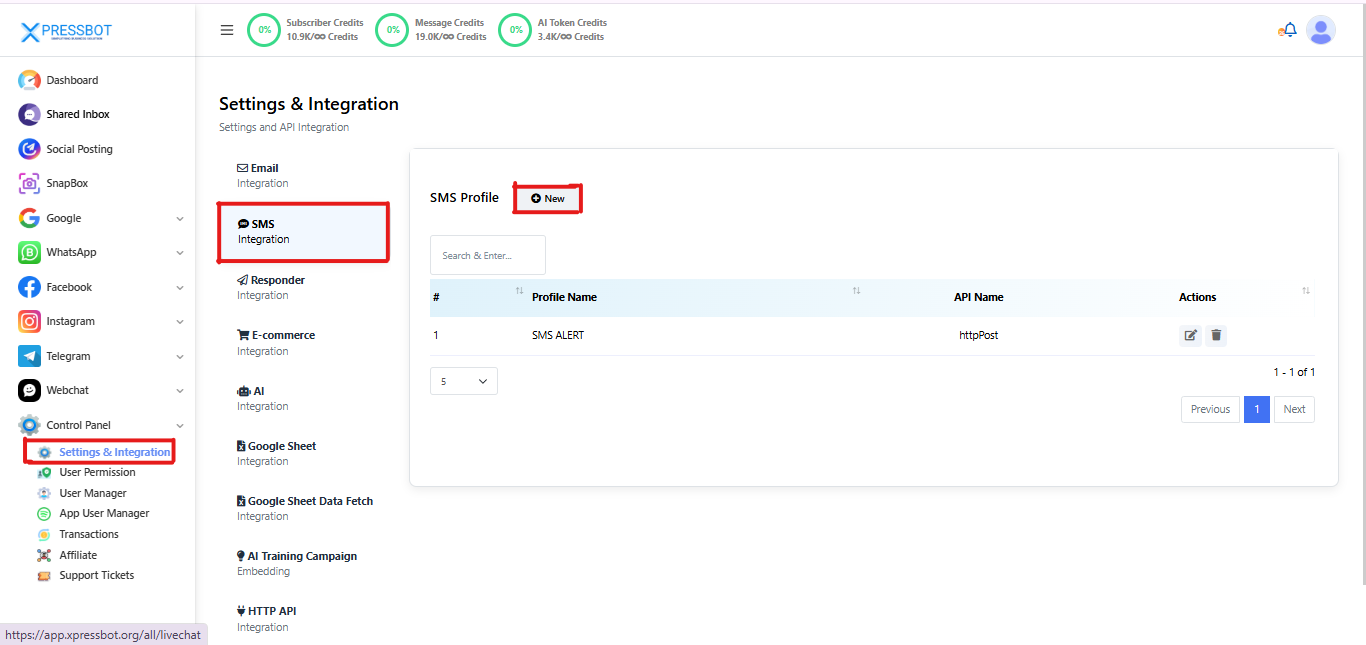
Step 2: Select HTTP GET and Enter API Details
In the SMS Profile setup modal:
- Choose “HTTP GET” as the integration type from the right-hand options.
- Enter a recognizable API Name (e.g.,
MyLocalGateway,PromoSMS2025) for internal reference. - Paste your complete HTTP GET URL in the designated field.
- The URL should already include all necessary query parameters required by your SMS provider.(e.g., phone number, message, API key)
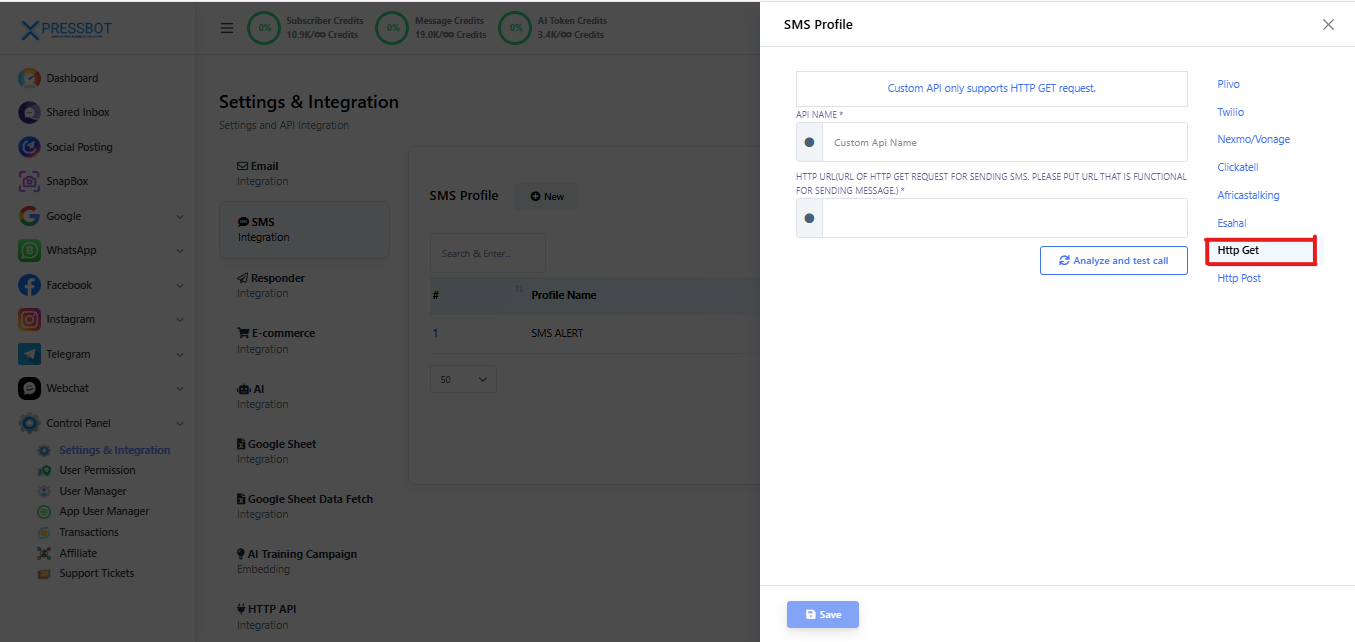
Step 4: Test and Save
- Click on the Analyze and test call button to verify the URL is working.
- Once confirmed, click Save to store your custom SMS gateway profile.
Conclusion
Integrating a custom SMS gateway using the HTTP GET method in XpressBot provides a quick and effective way to expand your messaging capabilities. Whether you’re using a local SMS provider, a private server, or a niche API not officially supported, this method ensures you can still deliver messages reliably through your own infrastructure.
With just a few simple steps — selecting HTTP GET, entering the proper API URL, and saving your profile — you gain full flexibility over how SMS messages are sent from your XpressBot workflows.
This approach is especially beneficial for:
- Lowering operational costs
- Ensuring regional compatibility
- Retaining control over your message routing and delivery
Start building your custom SMS workflows with ease and make XpressBot work seamlessly with any gateway you trust.